Getting money off a prepaid card sounds simple.
But it isn’t always!
About 22% of adults earning under $25,000 don’t have a traditional bank account, according to Federal Reserve data.
Prepaid cards fill the gap.
But moving that money somewhere you can actually use it?
That’s where things get complicated.
The method that works depends entirely on one thing…
What kind of card you’re holding!
I tested this at my local Walmart, dug through dozens of forum threads, and tracked down real error messages from real people who hit walls.
In this guide, I’ll show you every working method, the ones that get accounts banned, and the card-type split that most instructions skip entirely.
Before we get into the methods, here’s a quick reference for which card type leads where:
| Card Type | Has Routing Number? | Best Method | Timeframe |
|---|---|---|---|
| GPR (Green Dot, Netspend, etc.) | Yes | Direct ACH transfer | 1–3 business days |
| Gift card (Vanilla Visa, etc.) | No | P2P app / Netspend bridge / money order | Same day–3 days |
| Bluebird / Serve | Yes | ACH now (account closing June 3) | 1–3 business days |
| Unknown | Check below | Identify card type first | Varies |
Not sure which row you fall into?
Here’s how to figure that out in 60 seconds:
Step 1: Identify Your Prepaid Card Type (This Determines How You Transfer Money)
Card type determines everything.
Not the balance. Not the brand. Not whether it says Visa or Mastercard on the front.
The type of card you have decides which methods are even available to you.
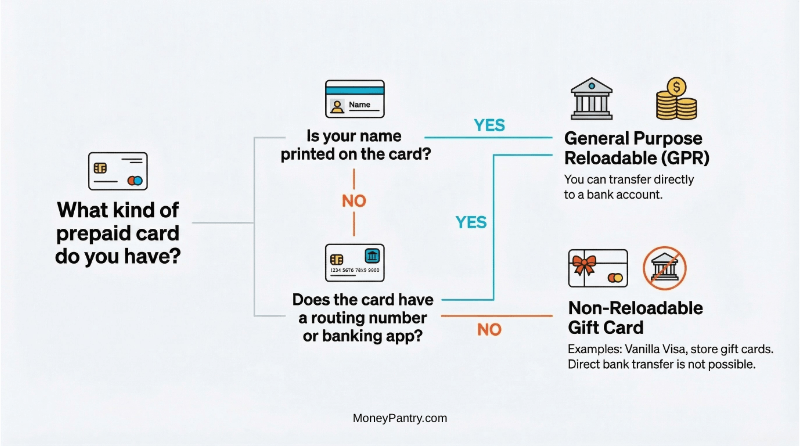
Use the wrong approach on the wrong card and you’ll hit a wall every time.
GPR Cards: You Can Transfer Directly
GPR stands for General Purpose Reloadable.
These are the cards that work like a real bank account, minus the bank.
Cards in this category include:
- Green Dot,
- Netspend,
- Walmart MoneyCard,
- Chime,
- Current,
- ReliaCard,
- Fintwist,
- and most payroll or government benefit cards.
How to tell if yours is a GPR card:
- Your name is printed on the front.
- It came with a welcome kit or app login.
- There’s a routing number in the app or on the back.
If any of those are true, you can transfer directly to a bank account. Method 1 is for you.
Non-Reloadable Gift Cards: You Need a Workaround
Vanilla Visa, Mastercard gift cards, store gift cards; these are a different animal entirely.
No name on the front. No app. No routing number. You probably bought it at a register or got it as a gift.
If your card doesn’t have a routing number, you cannot do a direct ACH transfer.
Methods 2 through 4 are what you’ve got.
Fast Card Identification in 60 Seconds
Not Sure?
Here’s How to Check Your Prepaid Card Type in 60 Seconds
Flip the card over and find the issuer name. It’s usually printed in small text near the bottom.
Google “[issuer name] routing number.”
If a result comes up, it’s a GPR card. If nothing comes up, treat it like a gift card and skip ahead to Method 2.
Prepaid Card Transfer Methods: Fees and Speed
Now you know what card you have.
Here’s how the four methods stack up before you pick one:
| Method | Fee | Speed | Best For |
|---|---|---|---|
| Direct ACH | Free | 1–3 days | GPR cards (Green Dot, Netspend, Walmart MoneyCard) |
| PayPal | 2.9% + $0.30 | 1–3 days | Gift cards with small balances |
| ATM withdrawal | $2.50–$3.00 + surcharge | Instant | Any card with a PIN, when you need cash now |
| Money order | $1.00–$3.40 by location | 1–2 days | Large balances; cards that block everything else |
GPR card? Method 1 is free and takes 1–3 days. Jump straight there.
Gift card? Start with Method 2 and work down the list from there.
⚠️Bluebird & Serve Shutdown
If you use an American Express Bluebird or Serve card, stop here.
There’s a hard deadline you need to know about before you do anything else.
Bluebird/Serve Account Closures Timeline
American Express officially announced it’s closing every Bluebird and Serve account.
Here’s the timeline:
- Bill pay already disabled as of February 24.
- Last day to add funds: May 5.
- All accounts closed: June 3, 2026.
That date doesn’t move.
What Happens to Bluebird/Serve Prepaid Card Balances
Amex will handle remaining balances based on how much you have left.
- Balance over $9.99: a check gets mailed to the address on file.
- Balance $9.99 or under: you get an Amex eGift Card instead.
Don’t wait for the final week. Initiate your ACH transfer now.
And verify your mailing address is current. If a check goes to an old address, getting it reissued is a headache you don’t need.
How to Transfer Your Bluebird or Serve Balance Now
- Log in to your Bluebird or Serve account.
- Go to Transfer.
- Enter your bank routing number and account number.
- Enter the amount you want to transfer.
- Confirm and submit.
Allow 3 business days to clear.
Do it today. June 3 is closer than it looks.
Method 1: Direct ACH Transfer (GPR Cards Only)
If you have a GPR card, this is the cleanest option.
No workarounds. No fees in most cases. Just a straight transfer to your bank.
How It Works:
- Open your card’s app.
- Tap Transfer or Move Money.
- Add your bank using your routing number and account number.
- Enter the amount you want to transfer.
- Confirm and submit.
A few things to know before you start:
- First transfer: Some cards require a $1 micro-deposit verification. It takes 1–2 business days.
- Name match: The name on your card must exactly match the name on your bank account. Even a missing middle initial can trigger a 10-day pending hold.
- Pro tip: Do a $1 test transfer first. Always. Confirm it lands before moving the full balance.
GPR Card Transfer Limits and Fees
| Card | Transfer Fee | Daily Limit | Timeline |
|---|---|---|---|
| Green Dot | Free | $1,000/day; $3,000/30 days (first transfer capped at $100) | 1–3 days |
| Netspend | Free online; $4.95 via phone | Plan-dependent | 1–3 days |
| Walmart MoneyCard | Free | Standard ACH limits | 3 days |
| Chime / Current | Free | Varies by account | 1–3 days |
Green Dot limits sourced from FinanceBuzz’s Green Dot review. Note: Green Dot caps your first transfer at $100, you won’t be able to move your full balance in one shot. These limits apply to inbound transfers into Green Dot; outbound transfer limits vary by account (check your account agreement). Netspend fees from Netspend’s official page.
When ACH Fails: What to Do
Most ACH problems come down to three things:
- Name mismatch: Call your card issuer to update the name, or use a method that doesn’t require name matching.
- Wrong routing number: Check the number inside the app, not the one printed on the card back. They sometimes differ.
- Transfer stuck in pending after 5 days: Call the card issuer, not your bank. The card issuer controls the hold.
If you’re using Cash App as your bank account, you’ll need your Cash App routing number to receive the transfer. Here’s how to load your Cash App card once it arrives.
Method 2: Transfer Money From a Gift Card Using PayPal or P2P Apps
This is the method everyone tries first.
It works sometimes. It also gets accounts permanently banned.
Here’s what actually happens.
What Works (and What Doesn’t) by App
PayPal
Best bet: Add the card as a “Debit Card,” not a credit card.
It works for some gift card BINs. It fails for others. If you see the error “Visa Provisioning Service – NULL”, the card lacks the data fields PayPal needs to verify it. Nothing you did wrong; it’s a network-level block.
If it fails, wait 3–5 days and try again. Some readers found it worked after a short wait.
If it works, the fee is 2.9% + $0.30.
Want to skip the fees entirely? Here’s how to sell your gift card for PayPal cash instead.
Withdraw to your PayPal balance first, then transfer to your bank.
Cash App
“This card is not supported” is the standard response for non-reloadable Vanilla Visa BINs.
Dead end for most gift cards.
For a full breakdown of what does and doesn’t work, see my guide on transferring a gift card to Cash App.
Venmo
Skip this one entirely.
Venmo prohibits using personal accounts for goods or services transactions. Gift card cash-out falls into that gray zone. And users report permanent bans and 180-day fund holds as a result.
The risk isn’t worth it.
Zelle
Zelle requires a debit card linked to a U.S. bank account. Prepaid gift cards don’t qualify.
It won’t work.
Don’t waste your time!
The Netspend Bridge for Large Gift Card Balances
This one takes more steps, but it has the highest success rate for large gift card balances.
- Take your gift card to a store with a Netspend reload location.
- Load the gift card balance onto a Netspend account at the business center.
- Netspend is a GPR card, so Method 1 applies from here.
- Transfer from Netspend to your bank account.
One reader moved $15,000 this way.
Worth knowing if you’re dealing with a large balance.
Note: a Netspend reload fee applies at the store. Factor that in before you go.
What Everyone Gets Wrong About P2P Transfers
The advice that gets repeated constantly: “Just link it to Venmo or PayPal.”
But here’s what actually happens:
Most gift cards hit what I call the BIN Wall, a network-level block that rejects your card before any app even processes your request.
It’s not a settings issue. It’s not user error. The block happens before your request even gets through.
Bottom line: try PayPal first, it carries the lowest ban risk. Skip Venmo entirely. Cash App is a dead end for Vanilla Visa.
If none of those work, you may be better off selling the card. You can sell it locally for cash and get most of the value back without the headache.
Method 3: Amazon Trick to Convert Gift Card to Spendable Credit
This one doesn’t put money in your bank account.
But it frees up the same amount of cash in your wallet.
For some people, that’s good enough.
How the Amazon Gift Card Load Works
- Add your gift card to your Amazon wallet as a “Credit Card.”
- Call the number on the back of the card and get your exact balance to the cent.
- Load that amount minus $0.05 as an Amazon Gift Card balance. (Example: load $49.95 for a $50 card.)
- Wait 3 days for the authorization hold to expire.
- Load the remaining cents.
Your full gift card value now sits as Amazon credit.
This is a workaround readers have shared, not something I’ve personally tested.
Results may vary depending on the card’s BIN.
One more thing: don’t load more than 3 gift cards to your Amazon account in a 24-hour period. Users report account locks when multiple small-balance cards are loaded back to back.
Who Should Skip This
If you need actual cash in a bank account, this doesn’t help.
If you’re holding an Amex gift card specifically, I have a separate guide on how to turn Amex gift cards into cash.
If you have a GPR card, Method 1 is simpler and gets you real money.
This is for gift card holders who’ve exhausted other options and are comfortable using Amazon credit as a cash equivalent.
If that doesn’t work either, there’s one more option…
And it works on almost any card!
Method 4: Withdraw Cash From a Prepaid Card & Deposit It in Your Bank
This is the slowest option.
Also the most reliable one for cards that block everything else.
ATM Withdrawal
Works for GPR cards and gift cards that have a PIN assigned.
Green Dot charges $3.00 for out-of-network ATM withdrawals, with a $400/day withdrawal limit. Deposit the cash at your bank the same day.
Best for small balances where the fee is acceptable.
Money Order
Go to a Walmart or Kroger service desk. Walmart charges $1.00 for money orders up to $500 and $1.88 for amounts up to $1,000.
Those are your two best options.
Do not use USPS. Gift cards aren’t accepted for money orders there.
Avoid Western Union locations inside grocery stores too. They’ve gotten stricter in 2025 and now frequently require the name on the card to match your ID. That kills the option for unnamed gift cards entirely.
Once you have the money order, deposit it at your bank like a check.
It clears in 1–2 business days.
Need to find a location? Here’s how to find a money order near you.
What I Found Testing This at My Local Walmart

This is the most reliable method for cards that block P2P apps like PayPal.
I personally tested this at Walmart Supercenter #1265 on West Florissant Ave in Florissant to see if it still worked in 2026.
Here’s what I ran into:
- Vanilla Visa BINs 446317 and 411810 were rejected at the MoneyCenter POS.
- Cards processed fine under $50 but were blocked at exactly $50.
- Self-checkout blocked the debit function for money orders entirely. This appears to be a Midwest region setting.
- Split-payment attempts got flagged after the 3rd or 4th swipe.
- The Service Desk with a human operator on a legacy terminal had the highest success rate of anything I tried.
If the MoneyCenter rejects your card, don’t keep trying there.
Ask for a human at the Service Desk. That’s where it actually works.
Why Is My Prepaid Card Transfer Being Declined?
So you are at a register or trying a transfer and it fails.
Here’s what’s actually happening, and how to fix it:
“Card Not Supported” Error
If you see the error “Visa Provisioning Service – NULL,” it’s a network-level block.
There is no setting to change; the card issuer has simply blocked that specific app.
Wait 5 business days and try again, or move to Method 4.
Transfer Failing at Full Balance
When you initiate a transfer, the processor places a temporary hold equal to the amount. If you try to move your full balance, the hold and the transfer together exceed what’s available. It fails.
The fix: transfer your balance minus $5. If your card has $50, try $45. Once that clears, transfer the remainder.
Transfer Stuck in Pending
Wait 5 business days first. Still stuck? Call your card issuer, not your bank. Have your transfer confirmation number ready.
Name Mismatch
The name on your card must exactly match your bank account.
Even a missing middle initial triggers a hold.
Two fixes:
- Call your card issuer and ask them to update the name on file.
- Skip name matching entirely and use an ATM withdrawal or money order instead.
Your Card Is Expired
An expired card can’t be transferred regardless of method.
Call the issuer and ask for a replacement with the same balance. Don’t attempt any transfer until the new card is in hand.
Still running into something else? The questions below cover a few more scenarios.
Frequently Asked Questions
It depends on the card. GPR cards like Green Dot or Netspend can transfer to Cash App using your Cash App routing and account number. Non-reloadable gift cards like Vanilla Visa will usually get a “card not supported” response.
If your card doesn’t have a routing number, it’s not a GPR card. You can’t do a direct ACH transfer. Use Method 2 (P2P apps), Method 3 (Amazon), or Method 4 (ATM or money order) instead.
Sometimes. Add it as a debit card, not a credit card. If you see the “Visa Provisioning Service – NULL” error, the BIN Wall is blocking it. Wait 3–5 days and try again. Some cards work after a short wait; others never will.
If it’s a GPR Mastercard with your name on it, yes. Direct ACH transfer works the same way as Visa GPR cards. If it’s a non-reloadable gift card, you’ll need a workaround. Methods 2 through 4 apply.
Most ACH transfers take 1–3 business days. Walmart MoneyCard runs closer to 3. First-time transfers may take longer if micro-deposit verification is required.
GPR cards. Green Dot, Netspend, Walmart MoneyCard, Chime, Current, ReliaCard, and Fintwist all have routing numbers available in their apps. Non-reloadable gift cards never have routing numbers.
For personal transfers, no. Moving your own money from a prepaid card to a bank account isn’t taxable income. If you’re using P2P apps like PayPal to receive payments for goods or services, that’s a different story. For 2026, the IRS 1099-K reporting threshold is back to $20,000 and 200 transactions, so casual transfers won’t trigger a form.
American Express is permanently closing all Bluebird and Serve accounts on June 3, 2026. Bill pay is already disabled. The last day to add funds is May 5. If you have a balance, initiate your ACH transfer now. Balances over $9.99 will be mailed as a check to the address on file.
Log in to your card’s app and look under account details or settings. If it’s not there, check the back of the card for the issuer name, then Google “[issuer name] routing number.” If nothing comes up, your card doesn’t have one, it’s not a GPR card and can’t do a direct ACH transfer.
ACH transfers and money orders are US-specific. P2P apps like PayPal work internationally but fees and availability vary by country. If you’re outside the US, check your card issuer’s app directly for available transfer options.
Final Thoughts
Card type is the only thing that determines which method works.
Everything else follows from that.
- GPR card: Use Method 1. It’s free, direct, and takes 1–3 days.
- Gift card: Try PayPal first. Skip Venmo entirely. Keep the Netspend bridge in mind for larger balances.
- Hitting errors: Name mismatches and pre-auth holds are fixable. The BIN Wall usually isn’t. Move to a different method.
If you’re on Bluebird or Serve, don’t wait. Start your transfer today. June 3 is a hard close.
Still can’t get the money off your gift card?
You may be able to turn your Visa gift card into cash another way instead.
Which card do you have, and which method worked for you?
Drop it in the comments. Your experience might help someone else figure this out faster.