I know how it feels to stand at the checkout and wonder if your EBT card will work.
I’ve been there myself. In 2002, when I first arrived in the U.S. as a refugee with no money, I relied on my EBT card for a few months just to get by.
Good news: you can check your EBT balance in less than a minute.
Table of Contents
How to Check Your EBT Balance
You can check your EBT balance in seconds using any of these methods:
- Call the number on the back of your card (most accurate)
- Use an EBT app like Propel (fastest)
- Log in to your state’s EBT website
- Check your last receipt
- Swipe your card at a store terminal
In this guide, I’ll walk you through each method, show you which one is fastest, and explain which one to trust if something looks off. I’ll also share one surprising thing about using apps that can cause panic if you don’t know it ahead of time.
By the end, you’ll know not just how to check your EBT balance, but what to do if something is wrong.
Your EBT Card Has Two Balances: Food vs. Cash (Check the Right One)
Before you check your balance, there’s one key thing most people learn the hard way:
Your EBT card can have two separate balances:
- Food benefits (SNAP)
- Cash benefits (TANF or other state cash assistance)
These balances do not mix. Checking one will not show the other.
Who Has Which Balance?
- If you only receive SNAP, your card has a food balance only.
- If you get cash assistance, you have a cash balance.
Knowing this matters because this is the most common reason people think money is “missing.” You might check your balance, see a lower number than expected, and assume something is wrong. Usually what happened is you checked the food balance when you meant to check the cash balance, or vice versa.
As one CalWORKs forum member put it:
It would literally take 30 seconds to explain ‘your EBT card has two separate accounts — press 1 for food benefits, press 2 for cash benefits’ when people pick up their cards.” (Claimyr, CalWORKs EBT community, March 2025)
They’re right. Nobody tells you this upfront!
So next time you want to check your EBT balance, remember:
- Buying groceries? Check the food balance.
- Withdrawing cash? Check the cash balance.
SNAP = food benefits. TANF or cash assistance = cash benefits. Your EBT card holds whichever ones you’re enrolled in. To know which you have, check your state agency approval letter or call your caseworker.
According to the USDA Food and Nutrition Service, EBT is used for SNAP food benefits and may also carry TANF cash benefits, depending on your state program.
Fastest Ways to Check Your EBT Balance Using an App
If you want to know your balance before heading into the store, using an app is the fastest method.
It takes less than a minute and there is no phone menu or waiting.
There are four apps worth knowing about. Two of them I’d actually recommend.
Here’s how they break down:
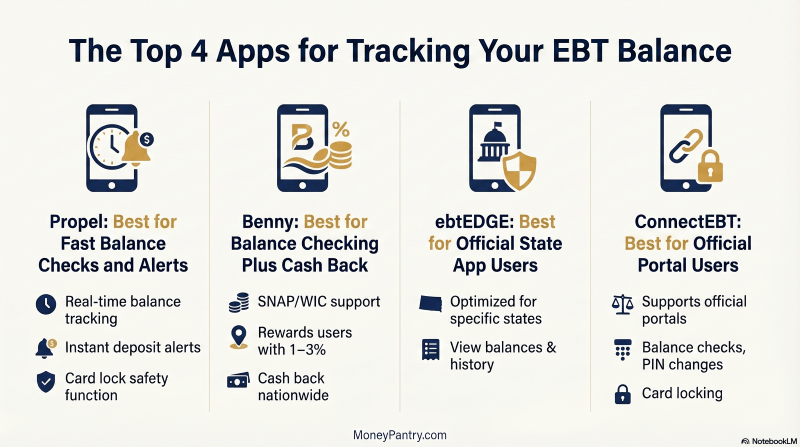
Propel: Check Your EBT Balance in Real Time
Propel is the one most people land on, and for good reason.
It:
- Shows your real-time SNAP and cash balance
- Sends deposit alerts so you know when benefits arrive
- Lets you lock your card if it’s lost
- Flags out-of-state activity that may indicate fraud
It’s free, available in English and Spanish, and works in every US state except Iowa and Montana.
One thing to note: in 23 states, transaction history only shows the amount, not the retailer. Keep receipts if you need exact tracking.
According to Propel, it also stores up to two years of transaction history, which is useful if you’re budgeting or need to dispute a charge.
Benny: Check Your EBT Balance and Get Cash Back
Benny does everything Propel does for balance checking. But it also offers something no other EBT app offers: 1-3% cash back on SNAP purchases at Walmart, Target, Kroger, Costco, and other major retailers.
It’s free, and:
- Works in all 50 states, DC, Puerto Rico, US Virgin Islands, and Guam
- Shows both SNAP and WIC balances if you have both
One caveat: the receipt-scanning feature for cash back can sometimes be unreliable according to App Store reviews. That’s the cash-back side of the app, not the balance checking. Your balance display works fine regardless.
If you’re going to use one app regularly, Benny gives you more for free. The cash back alone makes it worth it.
State Apps: ebtEDGE and ConnectEBT
Some states have their own official apps instead of Propel or Benny:
ebtEDGE: Official State EBT Balance Checker
ebtEDGE is used in New York, Florida, Washington, Colorado, and several other states.
It’s free and shows your balance and up to six months of transaction history.
It works fine most of the time, but if the number looks off, trust the phone system over the app. There’s a known display issue where the app can show a much lower balance than what’s actually in your account.
More on that in the troubleshooting section below.
ConnectEBT: Check Your EBT Balance Online
ConnectEBT covers 15 states, including Georgia, Illinois, Ohio, Pennsylvania, and New Jersey.
It’s free, shows 12 months of transaction history, and lets you change your PIN and lock your card.
If you’re outside those 15 states, you’ll get an error or a redirect when you try to sign up.
One person in a CalFresh forum summed up the app experience well:
“The EBT app has been a lifesaver for checking my balance — wish I had known about it sooner!” (Claimyr, CalFresh EBT community, April 2025)
Here’s a side-by-side look at the main EBT apps and what they offer:
| App | Cost | States Covered | Standout Feature |
|---|---|---|---|
| Propel | Free | All except Iowa and Montana | Deposit alerts, card lock, fraud monitoring |
| Benny | Free | All 50 states + DC, PR, territories | 1-3% cash back on SNAP purchases |
| ebtEDGE | Free | Multiple states (NY, FL, WA, CO, others) | Official state app for supported states |
| ConnectEBT | Free | 15 states (GA, IL, OH, PA, NJ, others) | 12-month history, PIN change, card lock |
Check Your EBT Balance by Phone
Apps are handy, but calling is the one way that always gives you the right answer.
If your app shows the wrong balance, call the automated phone line. It checks your balance straight from your state’s EBT system so there is no delays, no glitches and no old numbers from a few days ago.
Sure, automated menus can be annoying. But two minutes on hold is way better than getting declined at checkout.
How to Check Your Balance by Phone
The whole call takes less than two minutes if you have your card and PIN ready.
Check Your EBT Balance Online via Your State Portal
No phone, no app?
No worries!
Your state has a web portal where you can log in and check your balance from any browser. You’ll need your card number to register the first time, but after that, logging in is quick.
Most states use either ebtEDGE or ConnectEBT as their online portal. Some larger states have their own custom portals.
Portals for States with the Highest SNAP Enrollment
| State | Portal Name | Portal URL |
|---|---|---|
| California | BenefitsCal | benefitscal.com |
| New York | ebtEDGE / myBenefits | ebtedge.com or mybenefits.ny.gov |
| Texas | YourTexasBenefits | yourtexasbenefits.com |
| Florida | myACCESS | myaccess.myflfamilies.com |
| Georgia | ConnectEBT | connectebt.com |
| Pennsylvania | ConnectEBT | connectebt.com |
| New Jersey | NJ Families First | njfamiliesfirst.com |
| Ohio | ConnectEBT | connectebt.com |
| Illinois | ConnectEBT | connectebt.com |
| Washington | ebtEDGE | ebtedge.com |
| Colorado | ebtEDGE | ebtedge.com |
| Massachusetts | ebtEDGE | ebtedge.com |
Don’t see your state? The USDA Food and Nutrition Service lists state EBT websites for all states and territories, confirming that EBT is available nationwide.
Online portals are useful for checking balances and transaction history, but they update slower than the phone system. If you need your exact balance before shopping, using the phone or an app is faster and more accurate.
Three Other Ways to Check Your EBT Balance
No smartphone? No internet connection?
No problem. These three methods work without either.
Your Receipt
Every time you use your EBT card at a store, your receipt prints your remaining balance at the bottom. It’s automatic so you don’t have to do anything extra.
Keep in mind: This only reflects your balance after that transaction. If you want to know your balance before shopping, you’ll need your last receipt.
The Store Terminal Before You Start Shopping
This method is often overlooked but it’s genuinely useful.
At any grocery store checkout, before you start ringing up your items, you can swipe your EBT card and select “Balance Inquiry” at the terminal. Enter your PIN and it shows your current balance. No purchase required.
It only takes about 15 seconds, so you can walk in knowing exactly what you can spend.
Now, not every store has this enabled, but most major grocery chains do. If the terminal doesn’t show a balance inquiry option, ask the cashier, some stores can run it manually before scanning your items.
An ATM (Cash Balance Only)
If your EBT card has cash benefits, you can check your cash balance at any ATM that displays the Quest logo.
Two things to know before you do this though:
- Some ATMs charge a fee for balance inquiries, even if you don’t withdraw money.
- ATMs only show your cash balance, not your SNAP food balance.
If you’re withdrawing cash anyway, checking your balance at the same ATM makes sense. But if you’re only checking, an app or the phone line is free and faster.
And if you do use ATMs for cash withdrawals, read my guide to Free EBT ATMs so you don’t end up losing money on fees.
What to Do When Your EBT Balance Looks Wrong
A confirmed balance doesn’t always mean your card will work.
And a $0 reading doesn’t always mean your money is gone.
There are five specific reasons your balance might look wrong, and most of them have nothing to do with your benefits actually being missing.
Here’s how to work through each one:
App Showing Wrong EBT Balance
If your app shows $0 but you know you have benefits, don’t panic!
Some EBT apps (especially ebtEDGE) have a documented display issue where the balance in the app doesn’t match your actual account.
This seems to be a common issue. I found a bunch of first hand accounts of users on Claimyr, CalFresh EBT community from April of 2025 mentioning seeing app balances like $0, $12, or $31, while the phone system confirmed actual benefits ranging from $142 to $237.
One person described it this way:
“The app has been showing my balance as $12 when I actually have over $150 according to the phone system. What’s really frustrating is that I rely on the app to budget my grocery trips, especially when I’m shopping with my kids.”
Another found out the hard way at the register:
“I discovered this issue the hard way when my card got declined at the grocery store checkout, even though the app said I had $47 available. Turns out I actually had $184 according to the automated phone line. I felt so embarrassed having to leave my groceries behind.”
Good to know
If your app shows a balance that looks wrong, always call the number on the back of your EBT card. The phone system pulls directly from your state’s EBT database and is the most reliable source.
You’re Looking at the Wrong Balance
If you have both SNAP and cash benefits on your card, it’s easy to check one when you meant to check the other.
The phone system and most portals ask you to choose which balance you want. Make sure you’re selecting the right one.
This was covered in more detail in the first section, so it’s worth a quick reread if this sounds like your situation.
EBT Deposit Not Posted Yet
EBT benefits don’t always load at midnight. In some states, deposits process throughout the day on your scheduled date.
If your balance shows $0 on your deposit day, it may just not have posted yet.
Knowing your exact deposit date and usual posting time helps you tell whether $0 means “not yet” or “something is actually wrong.”
Read my guide about when your EBT benefits are deposited to see when your benefits should arrive.
Your Card Has a Fraud Flag on It
If you recently used your card in a different state, entered the wrong PIN multiple times, or made purchases that looked unusual to your state’s fraud system, your card may have been temporarily flagged.
Now a fraud flag doesn’t erase your balance. It just blocks transactions until you verify your identity.
If that happens, here’s what you do:
Call the customer service number on the back of your card and they’ll walk you through clearing it. Usually takes a few minutes.
There’s a System Outage
EBT systems sometimes go down. When that happens, your card can be declined even if your balance is full.
If your card declines and nothing else explains it, try a different store or wait an hour and try again. You can also call the number on your card to check for known outages in your state.
One person almost skipped grocery shopping because of a wrong $0 reading:
“I almost didn’t buy groceries for my family last weekend because I thought I was nearly out of benefits. I ended up doing a tiny shopping trip and felt terrible about it until I called to double-check.”
So remember if and when something looks wrong, call first to make sure.
EBT Inactivity Rule: Why Your Balance Can Disappear
Here’s a surprising fact: if you don’t use your EBT card for nine months, your SNAP benefits can be permanently removed!
This isn’t a glitch or an error. It’s federal policy.
According to the USDA Food and Nutrition Service, SNAP benefits are permanently expunged from EBT accounts after nine months of account inactivity. Your state is required to mail you a warning notice at least 30 days before it happens.
The worst part?
Once benefits are expunged, they’re gone for good. They cannot be restored.
But the good news is that you can prevent this by keeping your account active.
Any activity (like a purchase, a return, or even a balance inquiry at a store terminal) counts.
So if you receive benefits but shop infrequently, make sure to buy something with it at least every few months to keep your account active.
This rule applies to SNAP food benefits. For TANF cash benefits, inactivity rules differ by state, so check your state’s policies if cash benefits apply to you.
Frequently Asked Question
You usually can’t check it without the card number or account login. If you don’t have the card with you, the fastest workaround is to use the app or online portal if you already set them up.
No, checking your balance on the state website, official app, or customer service line is generally free. Some ATMs can charge fees, so only use one if you also need cash benefits or your state says it’s fee-free.
That usually means the app is lagging or displaying the wrong number. When the app and phone line disagree, trust the phone system first because it pulls from your state’s EBT account data directly.
A $0 balance can happen if your deposit has not posted yet, you checked the wrong account, or the app is showing stale information. If the number looks wrong, call the number on the back of your card before you panic.
That depends on your state, and deposits do not always hit at midnight. Some benefits post later in the day, so if you check early and see $0, it may simply mean the load has not processed yet.
Yes. SNAP food benefits and cash benefits are separate balances, so make sure you choose the right one when you check by phone, online, or at the terminal.
An ATM will only show cash benefits, not your SNAP food balance. If you need to check SNAP, use the phone line, app, website, receipt, or store terminal instead.
Call the customer service number on the back of your card and ask if there is a fraud flag, card freeze, or system issue. If everything looks normal, try the card again at a different store or a little later.
In some states, yes, a balance inquiry can count as activity and help keep the account active. Still, it’s smart to use your benefits regularly so you do not risk losing them to inactivity rules.
Look up your state’s official human services or EBT page, or use the USDA state EBT website directory. That is the safest way to get the right portal instead of landing on an unofficial site.
Yes, many stores let you run a balance inquiry at the terminal before you start shopping. It’s a fast option when you want to know exactly how much you can spend.
How I Researched This Article
To put this guide together, I dug into community forums like CalFresh and CalWORKs support threads on Claimyr, plus Quora discussions. I also read reviews on the Apple App Store and Google Play for Propel, Benny, ebtEDGE, and ConnectEBT.
For the app glitch issue, I relied on multiple threads from April 2025 where real cardholders reported balance differences between the ebtEDGE app and the phone system.
Authoritative sources I checked include the USDA Food and Nutrition Service, state EBT pages from Florida DCF, New York OTDA, Texas HHS, Georgia DFCS, and New Jersey DHS, as well as official documentation from Propel and Benny.
I double-checked all app availability claims, state portal URLs, and platform features against live sources in April 2026. I also confirmed the 274-day expungement rule directly from the USDA FNS expungement policy page.
The Bottom Line
For day-to-day use, Propel or Benny are the fastest ways to check your EBT balance. Both are free and reliable for balance checking, plus Benny adds cash back on top. Download one and set it up before your next shopping trip.
If your balance ever looks off (wrong number, unexpected $0, or a decline when you know you have money) call the number on the back of your card. The phone system is the definitive source and should always be trusted over any app.
And if you’re new to EBT and want the full picture, check out my complete guide to using your EBT card. It covers everything from activation to what you can buy and where, plus tips to get the most out of your benefits.
Which method do you use to check your EBT balance? Have you ever had an app show you the wrong number? Leave a comment below.